
Finding all Stored Procedures that calls a Function in SQL Server | SQL Server Tutorial
The below Stored Procedure searches within all the stored procedures in the SQL server database, views, and functions for the given function name. This stored procedure also search for any text written in the stored procedure, not just function names.
CREATE PROCEDURE dbo.Find_Text

    @SearchValue nvarchar(500)

AS


SELECT DISTINCT

    s.name+'.'+o.name AS Object_Name,o.type_desc

    FROM sys.sql_modules        m

        INNER JOIN sys.objects  o ON m.object_id=o.object_id

        INNER JOIN sys.schemas  s ON o.schema_id=s.schema_id

    WHERE m.definition Like '%'+@SearchValue+'%'

        --AND o.Type='P'  --<uncomment if you only want to search procedures

    ORDER BY 1

GO
Finding Stored Procedures that Accesses Particular Table or Column in SQL Server | SQL Server Tutorial
By querying the Procedures table in Sys as given below, we can find the SQL Server stored procedures that refers particular column are tables.
The result will be the list of SQL Server stored procedure names that refers to particular table or column.
SELECT Name
FROM sys.procedures
WHERE OBJECT_DEFINITION(OBJECT_ID) LIKE '%TableNameOrColumnName%'
The result will be the list of SQL Server stored procedure names that refers to particular table or column.
Deleting Multiple Records in Entity Framework | Entity Framework Tutorial
Sometimes you may need to delete multiple records. In such case, developers use to iterate through the collection using foreach and will set each entity state to modified. Some developers use to write an extension method as below to handle deleting multiple records in entity framework.
Extension Method:
public static void DeleteObjects(this ObjectSet set, Expression> predicate)
    where T : EntityObject
{
    foreach (var entity in set.AsQueryable().Where(predicate))
        set.DeleteObject(entity);
}
Usage of Extension Method
db.Employees.DeleteObjects(x => x.Country == "India");
However to make the life of the .Net developer easier, entity framework 6 has introduced a method named RemoveRange to delete multiple records at one shot as given in the below code snippet:
db.People.RemoveRange(db.Employees.Where(x => Country == "India"));
How to Get Browser Agent from ASP.NET Web API Controller? | ASP.NET Web API Tutorial
The easiest way to get the full user-agent from inside an ASP.NET Web API-controller is as given below:
var userAgent = Request.Headers.UserAgent.ToString();
It gives exactly the same result as doing the manual step like this:
// var headers = request.Headers.GetValues("User-Agent");
// var userAgent = string.Join(" ", headers);
Excluding Required Property from ModelState.IsValid | ASP.NET MVC Tutorial
You can exclude any property from validating using parameter binding. Set the exclude property in Bind attribute of a parameter as
In this way, by add exclusions to your action and explicitly state what can and can't be binded we can achieve in ASP.NET MVC
[Bind(Exclude = "Password")] In this way, by add exclusions to your action and explicitly state what can and can't be binded we can achieve in ASP.NET MVC
public class Person
{
    public int id { get; set; }

    [Required]
    public string FirstName { get; set; }

    [Required]
    public string LastName { get; set; }
}
FirstName And LastName are Requerd. I want to exclude LastName from validating:
public ActionResult Edit([Bind(Exclude = "LastName")]Person person)
{
    //your code for ModalState validation;
}
Process Flow of Single and Multitenancy ASP.NET MVC Application | ASP.NET MVC Tutorial
Single-Tenancy Application
The steps that lead from a user entering a website address in his browser to viewing the content are fairly straightforward. The browser sends a request for the content at that address to a server. The server receives the request, matches the address with an application, and passes the request on to that application for processing. The application reads the request, creates a response, and passes the response back to the server. The server returns the response to the browser and the browser presents the response content to the user. This is sometimes referred to as a single tenant application architecture. Each client application is matched with a single IP address and host name so that, as requests come in, the server can route them to the appropriate application (Figure 1).
Simplifying AccountController by Removing External Login Related Actions | ASP.NET MVC Tutorial
There are a number of methods on AccountController related to External Logins. If you examine AccountController carefully, you can go through and delete the code for the following actions:
Delete External Login Related Views:
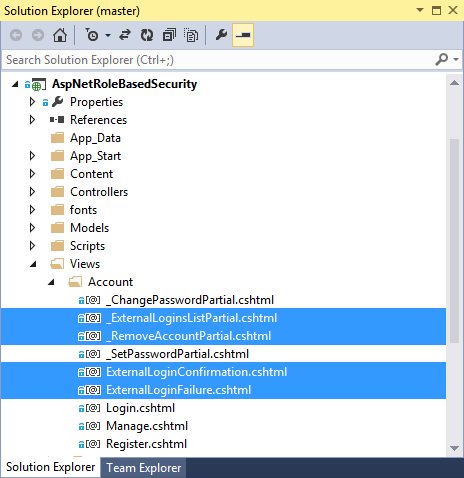
Along with the unnecessary Controller methods we just removed, we can also remove the unnecessary views related to external logins. If we open the Views => Account folder in Solution Explorer, we find we can delete the highlighted views below from our project:

- Dissociate()
- ExternalLogin()
- ExternalLoginCallback()
- LinkLogin()
- LinkLoginCallback()
- ExternalLoginConfirmation()
- ExternalLoginFailure()
- RemoveAccountList()
- The member constant XsrfKey
- The entire class ChallengeResult
Delete External Login Related Views:
Along with the unnecessary Controller methods we just removed, we can also remove the unnecessary views related to external logins. If we open the Views => Account folder in Solution Explorer, we find we can delete the highlighted views below from our project:
ng-model Doesn't Work Inside ng-if | Scope Properties Doesn't Change inside ng-if | AngularJS Tutorial
If an ng-model is used inside an ng-if, then the model does not work as expected.
To modify the data in the parent scope, you'll need to make use of $parent as given below:
You can use $parent to refer to the model defined in the parent scope like this
<div ng-app >
    <div ng-controller="main">

        Test A: {{testa}}<br />
        Test B: {{testb}}<br />
        Test C: {{testc}}<br />

        <div>
            testa (without ng-if): <input type="checkbox" ng-model="testa" />
        </div>
        <div ng-if="!testa">
            testb (with ng-if): <input type="checkbox" ng-model="testb" />
        </div>
        <div ng-if="!someothervar">
            testc (with ng-if): <input type="checkbox" ng-model="testc" />
        </div>

    </div>
</div>To modify the data in the parent scope, you'll need to make use of $parent as given below:
You can use $parent to refer to the model defined in the parent scope like this
<input type="checkbox" ng-model="$parent.testb" />
How to Convert Synchronous ASP.NET MVC Action to Asynchronous ASP.NET MVC Action | Asynchronous Support in ASP.NET MVC Controller | ASP.NET MVC Tutorial
In ASP.NET MVC controller action method receives data from a web request and passes the data to a view which then creates the HTML to be sent to the browser. Frequently the action method needs to get data from a database or web service in order to display it in a web page or to save data entered in a web page. In those scenarios it's easy to make the action method asynchronous: instead of returning an ActionResult object, you return Task<ActionResult> and mark the method with the async keyword. Inside the method, when a line of code kicks off an operation that involves wait time, you mark it with the await keyword.
Here is a simple action method that calls a repository method for a database query:
public ActionResult Index()
{
    string currentUser = User.Identity.Name;
    var result = fixItRepository.FindOpenTasksByOwner(currentUser);

    return View(result);
}
And here is the same method that handles the database call asynchronously:
public async Task<ActionResult> Index()
{
    string currentUser = User.Identity.Name;
    var result = await fixItRepository.FindOpenTasksByOwnerAsync(currentUser);

    return View(result);
}
Under the covers the compiler generates the appropriate asynchronous code. When the application makes the call to
FindTaskByIdAsync, ASP.NET makes the FindTask request and then unwinds the worker thread and makes it available to process another request. When the FindTask request is done, a thread is restarted to continue processing the code that comes after that call. During the interim between when the FindTask request is initiated and when the data is returned, you have a thread available to do useful work which otherwise would be tied up waiting for the response.Generating Unique Token in C# | Generating Unique Token that Expires after 24 Hours in C# | C# Tutorial
There are two possible approaches; either you create a unique value and store somewhere along with the creation time, for example in a database, or you put the creation time inside the token so that you can decode it later and see when it was created.
To create a unique token:
string token = Convert.ToBase64String(Guid.NewGuid().ToByteArray());
Basic example of creating a unique token containing a time stamp:
byte[] time = BitConverter.GetBytes(DateTime.UtcNow.ToBinary());
byte[] key = Guid.NewGuid().ToByteArray();
string token = Convert.ToBase64String(time.Concat(key).ToArray());
To decode the token to get the creation time:
byte[] data = Convert.FromBase64String(token);
DateTime when = DateTime.FromBinary(BitConverter.ToInt64(data, 0));
if (when < DateTime.UtcNow.AddHours(-24)) {
  // too old
}
Note: If you need the token with the time stamp to be secure, you need to encrypt it. Otherwise a user could figure out what it contains and create a false token.
Creating Cookie in ASP.NET MVC Action | Handling Cookies in ASP.NET MVC | Set Cookie Expiry in ASP.NET MVC | ASP.NET MVC Tutorial
We can create Cookie and set value to it in ASP.NET MVC Action method using the HttpCookie object using System.Web namespace. This created cookie should be added to HttpResponse object before returning the view in ASP.NET MVC Action method.
Below sample C# code demonstrated on how to create and set cookie in ASP.NET MVC Action method and pass it to Razor:
Below sample C# code demonstrated on how to create and set cookie in ASP.NET MVC Action method and pass it to Razor:
public ActionResult Index()
 {
HttpCookie cookie = new HttpCookie("cookie_name","cookie_value");cookie.Expires = DateTime.Now.AddDays(1);
   Response.Cookies.Add(cookie);
   return View();
 }
To get a cookie:
HttpCookie cookie = HttpContext.Request.Cookies.Get("cookie_name");
To check for a cookie's existence:
HttpContext.Request.Cookies["cookie_name"] != null
To save a cookie:
HttpCookie cookie = new HttpCookie("cookie_name");
HttpContext.Response.Cookies.Remove("cookie_name");
HttpContext.Response.SetCookie(cookie );
Removing an Item from Javascript Array | JavaScript Array pop() Method Example | JavaScript Tutorial
The pop() method removes the last element of an array, and returns that element. pop() method also changes the length of an array after removing the last element.
var fruits = ["Banana", "Orange", "Apple", "Mango"];
fruits.pop();
fruits.pop();
The result of fruits will be:
Banana,Orange,Apple
Accessing Parent Controller Scope in Child Controller in AngularJS | AngularJS Parent Controller Scope in Child Controller | AngularJS Tutorial
We can accessing Parent Controller Scope in Child Controller in AngularJS using $parent in $scope. Let us see an example below:
If your HTML is like below you could do something like this:
<div ng-controller="ParentCtrl">
    <div ng-controller="ChildCtrl">
    </div>
</div>
Then you can access the parent scope as follows
function ParentCtrl($scope) {
    $scope.cities = ["NY", "Amsterdam", "Barcelona"];
}

function ChildCtrl($scope) {
    $scope.parentcities = $scope.$parent.cities;
}
If you want to access a parent controller from your view you have to do something like this:
<div ng-controller="xyzController as vm">
   {{$parent.property}}
</div>
See jsFiddle: http://jsfiddle.net/2r728/